

How to follow a fund manager
Find fund managers by style and focus, read their manager page, and follow them to see their new comments in your feed.
Updated 18 Nov 2026 · 4 min read
In short
Every fund manager on Thesis Tracker has a page with their style, funds, fees and comments. Choose Follow on a manager page to see their new comments in the Following view of the live feed. Free accounts can follow up to five managers; Pro has no limit and adds email alerts, each manager's publications and fund returns against the benchmark.
Some investors research company by company. Others find a few fund managers whose approach they respect and follow what those managers do. Thesis Tracker supports both: every manager has a page, and you can follow managers to see their new comments as they are published.
Find managers
Open Managers in the left-hand menu. The list is sorted by most recent comment, and you can filter it by name. Advanced search at the top of the list filters managers by investment style, market cap focus, what they mainly publish, how many companies they discuss and how recently they commented. Pro adds fund size and fund returns against the benchmark.
What a manager page shows
- About: investment style, market cap focus, funds tracked, companies discussed, comments recorded, and the dates of the first and latest comment.
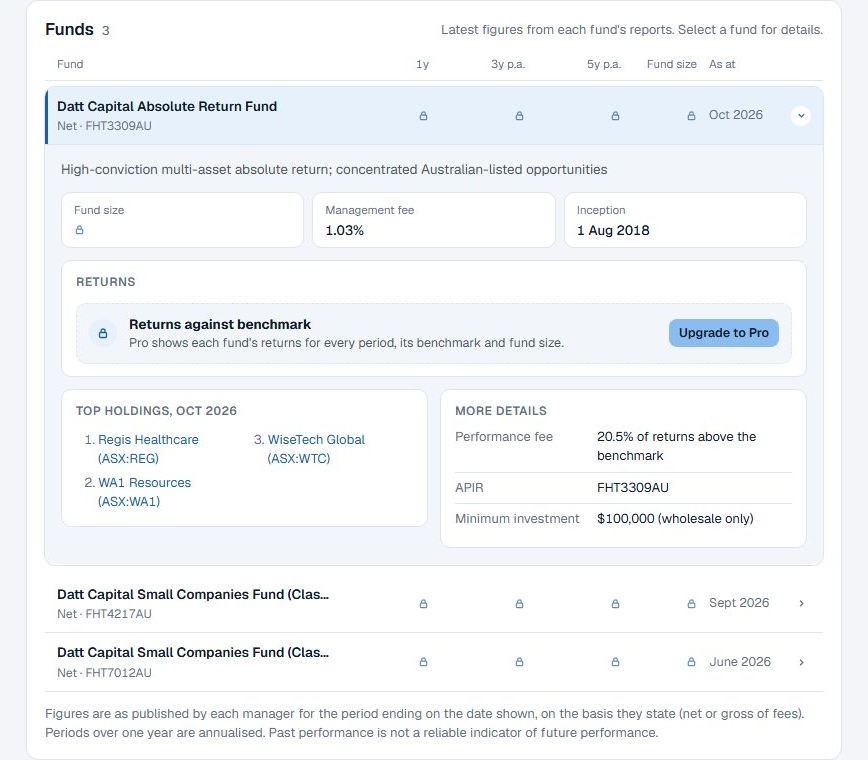
- Funds: each fund with its strategy, benchmark, fees, inception date, top holdings and APIR or ASX code. Pro adds reported returns against the benchmark and fund size.
- Publications (Pro): every report, letter and article from the manager, newest first, with the companies discussed in each. Opening one marks it read.
- Companies discussed, last 12 months (Pro): a month-by-month grid of every company the manager has written about, with their latest reported position.
- Commentary: the manager's comments on each company.
Follow a manager
On a manager page, choose Follow. Followed managers' new comments then appear in the Following view of the live feed, alongside comments on the companies on your watchlists. You can mark items read as you go.
Getting the most from it
- Follow a mix. Managers with different styles (small caps, income, long-short) will often disagree on the same company. That disagreement is useful.
- Read the mandate first. A manager's funds and style tell you what they are trying to do, which explains many of their decisions.
- Watch for changes. A manager who has held a stock for years and then exits is telling you more than one repeating the same view. See Reading a fund manager's position change.
- Following isn't copying. A manager's decisions suit their fund, not necessarily you, and their reports describe trades that may be weeks old.
Pair it with watchlists: How to use watchlists.
Follow a fund manager on Thesis Tracker
- Sign in. Sign in or create a free account.
- Find the manager. Open Managers, or press / and type the manager's name.
- Follow. On the manager page, choose Follow.
- Read their comments. Open the live feed and choose Following.
Questions
How many fund managers can I follow?
Up to five on a free account. Pro has no limit.
Where do I see comments from managers I follow?
In the live feed, choose Following. It shows new comments from the managers you follow and on the companies on your watchlists. Pro members can also get an email when a followed manager publishes.