

Notes, trades and your portfolio
Write private notes on a company, link your own models, record trades and track your holdings, all next to what fund managers have said.
Updated 17 Nov 2026 · 6 min read
In short
On any company page you can write private notes, link your own models and record trades, and they appear as rows in the commentary alongside the fund managers' comments. Trades feed your portfolio, which tracks holdings, gains and income. Notes and one portfolio with up to 3 holdings are free; Pro adds unlimited portfolios and holdings, the ASX 200 comparison and tax reporting.
Reading what fund managers think is half of research. The other half is your own thinking: why you bought, what would change your mind, and what actually happened. Thesis Tracker keeps both on the same company page.
Notes on a company
On any company page, choose Notes and trades, pick Note and write. Each note has a type, to help you find it later:
- Note: anything you want to remember.
- Decision: what you decided and why, ideally with what would prove you wrong.
- Review: looking back at an earlier decision.
Notes are dated (you can back-date one to when you actually made a decision), so they sit on the price chart and in the commentary at the right point in time. Only you can see them.
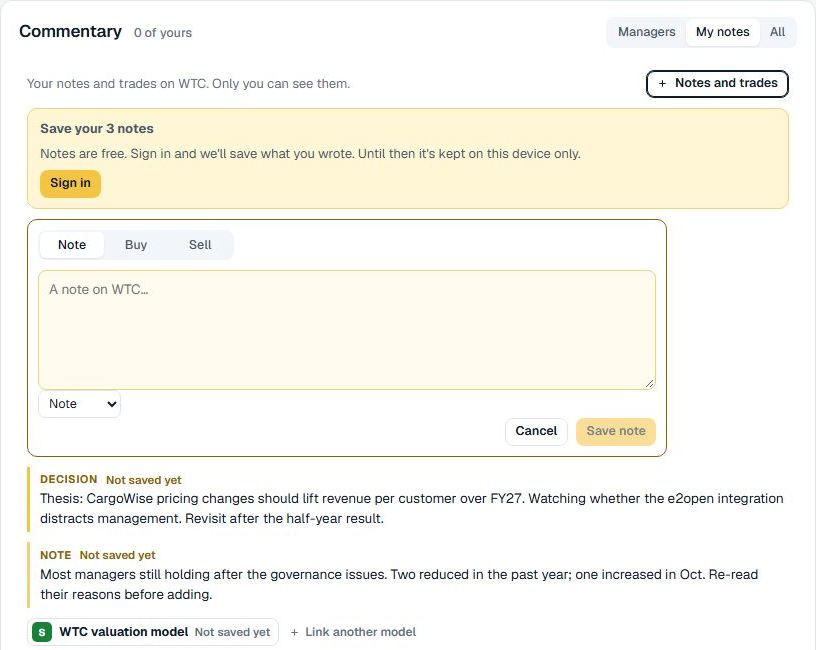
Link your own model
If you keep a valuation model, choose Link your own model and paste the link to a Google Sheet, an Excel file on OneDrive or SharePoint, or a Dropbox file. Only the link is saved, not the file. Next time you open the company, your model is one click away.
Read your notes next to the managers'
The commentary on a company page has a Managers / My notes / All switch. All mixes your notes and trades in with the managers' comments, by date, so you can see what you were thinking alongside what the professionals were saying. To show them by default, turn on "Show my trades and notes on the chart and in the commentary" on your Account page.
Record a trade
In Notes and trades, choose Buy or Sell, then the portfolio, date, units, price per share and brokerage. There is a box for your reason ("Why? Your thesis for this trade"), saved as a private note on the trade date. Trades appear on the company's price chart and flow into your portfolio.
Already have a trading history? On the Portfolio page choose Import CSV, download the template, fill it in from your broker's records (date, buy or sell, ticker, units, price, brokerage) and upload it. You will see a preview of new, duplicate and problem rows before anything is saved.
The portfolio
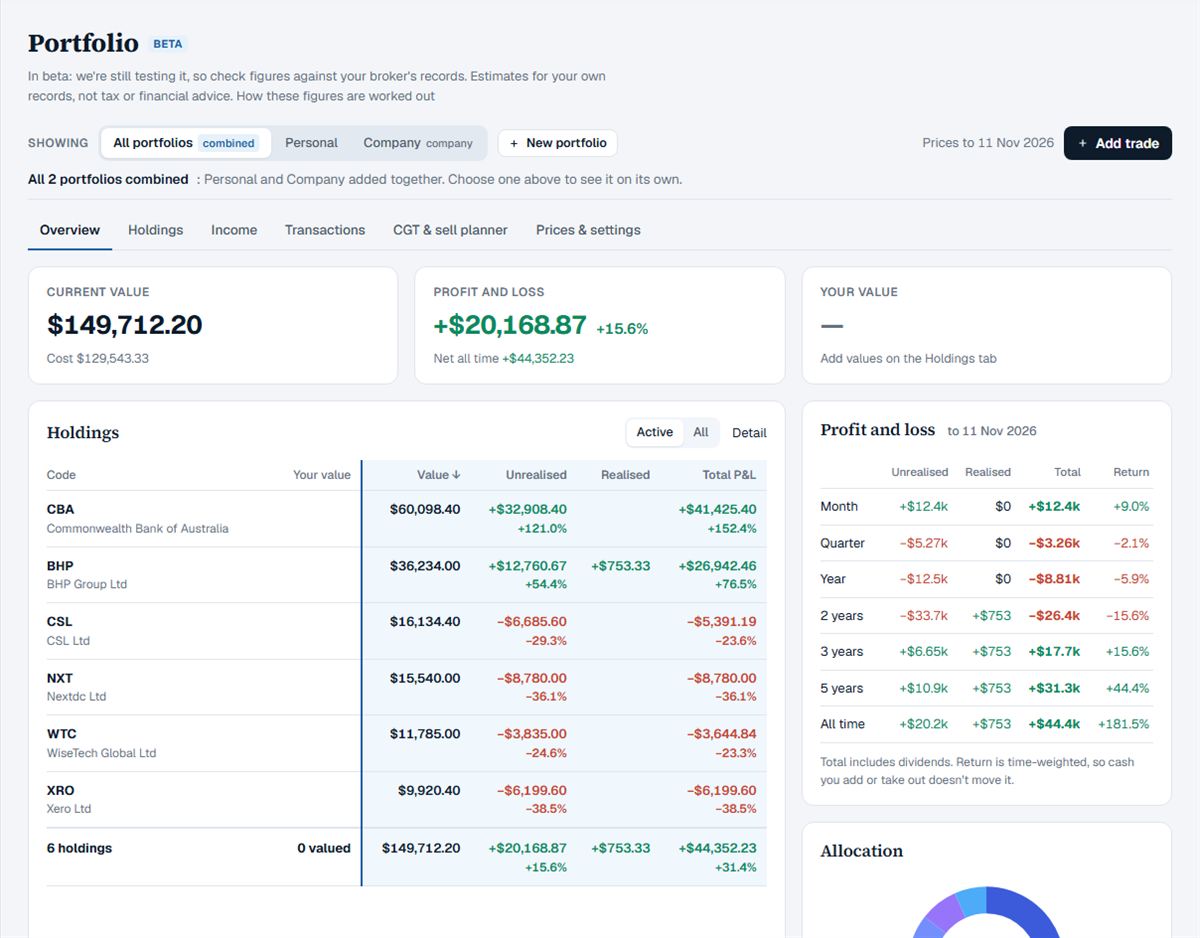
The Portfolio section has six tabs:
- Overview: current value, profit and loss, holdings, profit and loss by period, allocation, and the fund managers who have commented on your holdings.
- Holdings: each holding's units, cost, value and gains.
- Income: dividends and franking credits (Pro).
- Transactions: every trade, which you can edit, import or download as CSV.
- CGT & sell planner: an estimate of capital gains by financial year, and a planner that compares ways of choosing which parcels to sell (Pro).
- Prices & settings: price dates, portfolio settings and your data.
Prices are end-of-day closes, not live. Portfolio figures are estimates for your own records, not tax or financial advice: check them against your broker's statements and talk to your accountant about tax.
Portfolios can be held personally, by a company or by a self-managed super fund. The portfolio is in beta: tell us if a figure looks wrong.
Add a note and a trade to a company on Thesis Tracker
- Open the company. Search for the company and open its page.
- Add a note. Select Notes and trades, choose Note, write it and save. You can also link your own model.
- Record a trade. In Notes and trades choose Buy or Sell, enter the date, units, price and brokerage, and save it to a portfolio.
- See it in context. Switch the Commentary to All to see your notes and trades among the managers' comments.
Questions
Who can see my notes?
Only you. Notes are private to your account.
How many holdings can I track for free?
The free plan includes one portfolio with up to 3 open holdings. Pro has unlimited portfolios and holdings.
Is the tax report tax advice?
No. The tax pages are an estimate to help you prepare, not tax advice. Check your figures with your accountant or the ATO.