

How to use watchlists
Keep several named watchlists, start from a ready-made list, add companies quickly and see which fund managers changed their position on each one.
Updated 17 Nov 2026 · 4 min read
In short
Watchlists on Thesis Tracker are free with an account. You can keep up to 50 named lists, start by copying a ready-made starter list, add companies by typing a ticker or from any company page, and see each list's 90-day manager changes in the sidebar. Pro members also get an email when a manager publishes on a company they watch.
A watchlist is a list of companies you want to keep an eye on: the ones you own, the ones you are researching, or a theme you are following. On Thesis Tracker each watchlist also shows what fund managers have been doing on those companies, so you can see at a glance where something has changed.
Start with a starter list, or from scratch
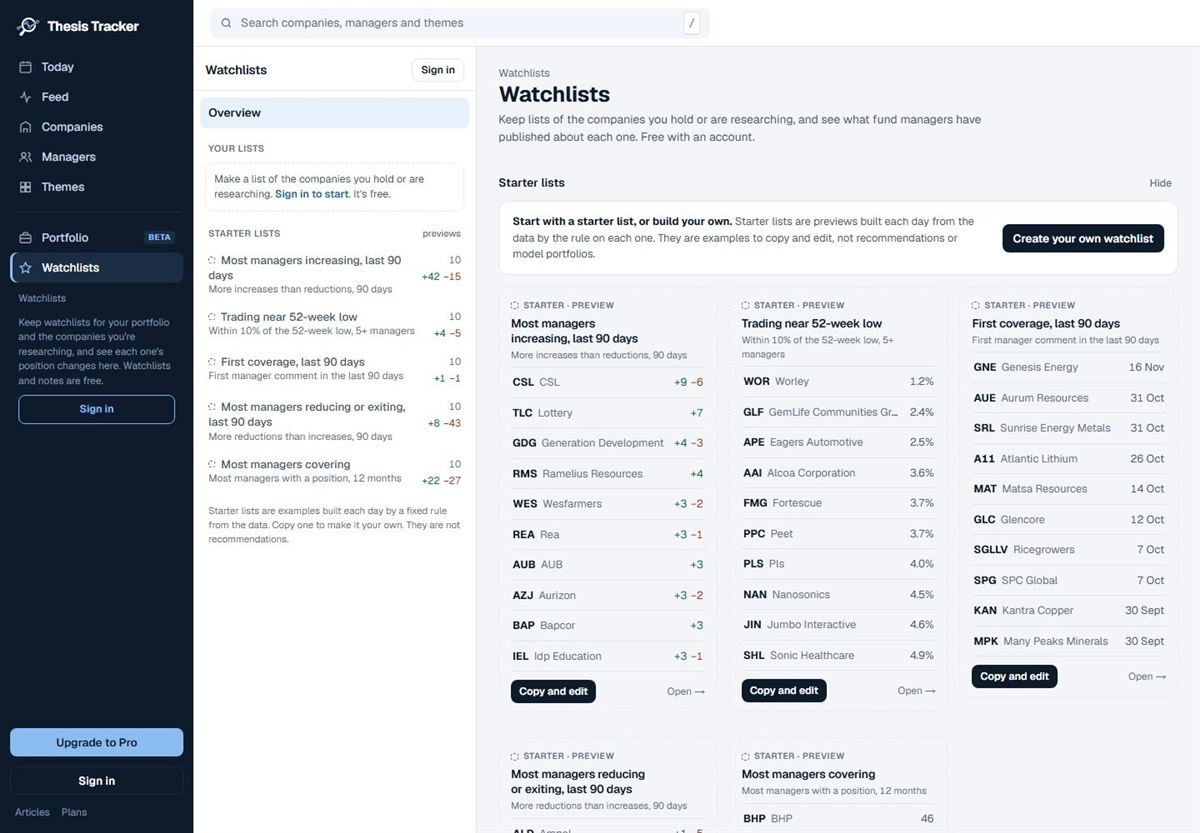
Open Watchlists from the left-hand menu. The first time you visit after signing in, you can choose to start with the starter lists (all five are copied as your own lists) or start from scratch with one empty list.
The starter lists are rebuilt every day from the data, with up to ten companies each:
- Most managers increasing, last 90 days
- Trading near 52-week low (within 10% of the low, with five or more managers)
- First coverage, last 90 days
- Most managers reducing or exiting, last 90 days
- Most managers covering
A starter list is a preview, not your list. Choose Copy and edit to make a copy you can rename and change. Starter lists are examples built by a fixed rule, not recommendations. If you don't want them, Hide them; you can show them again at any time.
Add companies quickly
- On the Watchlists page, choose Add companies, pick the list, and type a ticker or company name. Press Enter to add the highlighted match, then type the next.
- On any company page, choose Add to watchlist. If you have several lists, tick the ones it belongs on.
- From the search box (/ or Ctrl+K), select the star next to a company.
Keep several lists
Choose New watchlist and give it a name, for example "Owned", "Researching" or "Lithium". You can keep up to 50 lists, rename or delete them, and put a company on more than one.
What a watchlist shows you
Open a list to see:
- the number of companies, comments in the last 30 days, and managers increasing and reducing in the last 90 days,
- each company's managers' latest positions over 12 months, its 90-day changes and its latest comment,
- recent commentary on the companies in the list (the latest six free, all of them with Pro).
Your watchlist companies also appear in the sidebar on every page, with their 90-day changes (+ increased, − reduced) and a dot when a manager has published since your last visit.
Follow managers too
On a manager page, choose Follow to see their comments in the Following view of the live feed. Free accounts can follow up to five managers; Pro has no limit.
Signed out?
You can start a watchlist before you sign in. It is kept on your device until you sign in, and then saved to your account. Accounts are free; no card needed.
Next: keep notes and trades on the companies you watch. See Notes, trades and your portfolio.
Create a watchlist on Thesis Tracker
- Sign in. Sign in or create a free account with your email or Google.
- Open Watchlists. Choose Watchlist in the left-hand menu.
- Start a list. Choose New watchlist and give it a name, or open a starter list and choose Copy and edit.
- Add companies. Choose Add companies and type a ticker or company name, or use Add to watchlist on any company page.
- Check changes. See each company's 90-day manager changes in the list and in the sidebar.
Questions
Are watchlists free?
Yes. Watchlists are free with a Thesis Tracker account, up to 50 lists. You can even start one before signing in: it is kept on your device until you sign in.
Can I have more than one watchlist?
Yes. You can keep several named watchlists, for example one for companies you own and one for companies you are researching.
Do I get alerts when a manager comments on my watchlist?
Pro members can turn on email alerts for new commentary on their watchlist companies, and a Monday digest of the week's comments on their watchlists and holdings.